1. 왜 Vault가 필요할까?
Kubernetes 환경에서 Secret은 API 키, 비밀번호, 토큰처럼 민감한 정보를 저장하는 데 사용되지만,
실제 운영 환경에서는 단순히 Secret만 안전하게 보관하는 걸로는 충분하지 않습니다.
인증서, 데이터베이스 자격 증명, 클라우드 액세스 키, OAuth 토큰, TLS 인증서, 서명 키 등 서비스 전반에서 사용하는 모든 보안 자격증명이 관리 대상이 됩니다. 이러한 정보를 코드나 Git 저장소에 그대로 넣는 것은 보안상 위험합니다.
Vault는 이런 문제를 해결하기 위해 설계된 보안 비밀 관리 및 접근 제어 플랫폼입니다.
2. GitOps 환경에서 Vault의 필요성
GitOps의 핵심은 Git을 단일 진실의 원천(Single Source of Truth)으로 삼는 것입니다. 하지만 배포에 필요한 민감한 설정값(예: DB 비밀번호, API 토큰 등)을 Git에 그대로 넣을 수는 없습니다. Vault를 연동하면 다음과 같은 구조를 만들 수 있습니다.
이렇게 되면 Git에는 민감한 값이 저장되지 않고, ArgoCD가 배포할 때만 Vault에서 해당 값을 안전하게 주입 가능합니다.
3. ArgoCD Vault Plugin
ArgoCD Vault Plugin (AVP) 는 배포 시점에 Vault에서 Secret 값을 읽어와 Kubernetes 리소스에 자동 주입합니다. 결과적으로 Git에는 민감한 정보 없이 안전한 선언적 설정만 존재하게 됩니다.
[작동 방식]
- 개발자는 Git에 Secret Placeholder를 작성합니다.
-
apiVersion: v1 kind: Secret metadata: name: my-db-secret stringData: username: <path:kv-v2/data/demo#user> password: <path:kv-v2/data/demo#password>
- ArgoCD가 배포를 트리거할 때,
argocd-vault-plugin이 <path:...> 구문을 읽고 Vault에서 실제 값을 가져옵니다. - 가져온 값으로 템플릿을 렌더링해 Kubernetes에 배포합니다.
4. ArgoCD + Vault 연동 구조
- Vault는 Kubernetes Auth Method로 인증 (ServiceAccount 기반)
- ArgoCD Repo Server는 ServiceAccount 토큰을 이용해 Vault에 로그인
- Vault Policy로 필요한 Secret 경로만 접근 허용
이 구조를 통해 Git은 완전히 클린 상태로 유지하면서
배포 시점에는 Vault에서만 인증된 Secret이 주입됩니다.
5. 실습 진행 (ArgoCD + Vault)
5-1. ArgoCD 설치
kind create cluster --name myk8s --image kindest/node:v1.32.8 --config - <<EOF
kind: Cluster
apiVersion: kind.x-k8s.io/v1alpha4
nodes:
- role: control-plane
  labels:
    ingress-ready: true
  extraPortMappings:
  - containerPort: 80
    hostPort: 80
    protocol: TCP
  - containerPort: 443
    hostPort: 443
    protocol: TCP
  - containerPort: 30000
    hostPort: 30000
  - containerPort: 30001
    hostPort: 30001
  - containerPort: 30002
    hostPort: 30002
  - containerPort: 30003
    hostPort: 30003
EOF
kubectl get nodes myk8s-control-plane -o jsonpath={.metadata.labels} | jq
kubectl apply -f https://raw.githubusercontent.com/kubernetes/ingress-nginx/main/deploy/static/provider/kind/deploy.yaml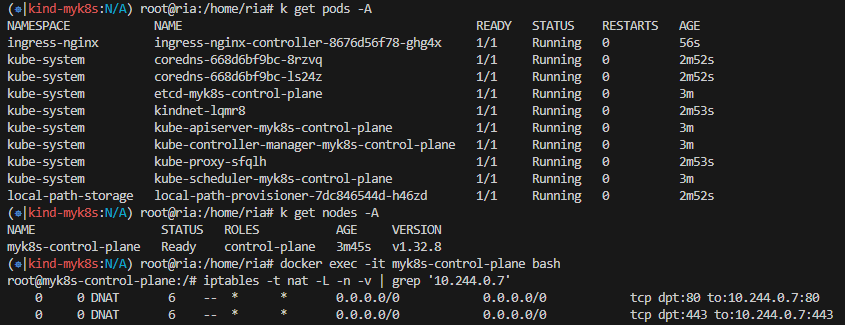
kubectl edit -n ingress-nginx deployments/ingress-nginx-controller

"--enable-ssl-passthrough" args 추가
5-2. OpenSSL로 self-signed 인증서 생성 및 Secrets 생성
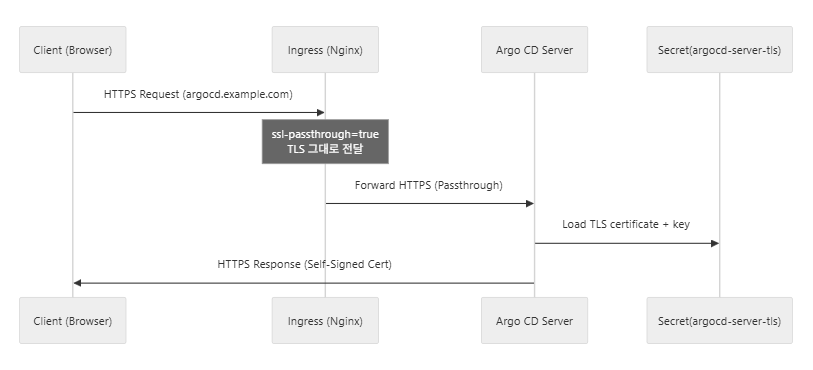
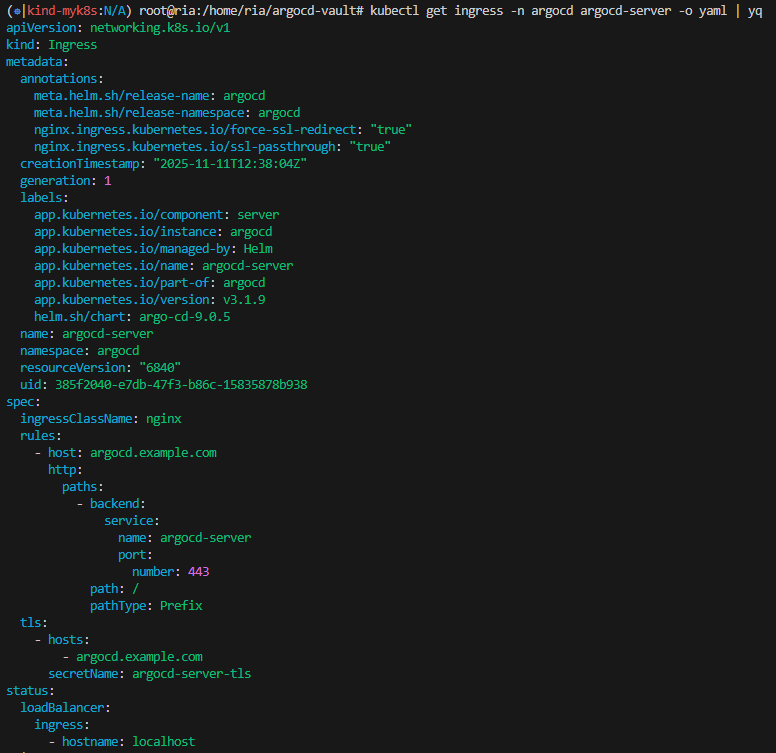
- Argo CD 서버는 TLS 인증서를 "argocd-server-tls" Secret 에서 직접 로드
- server.ingress.tls=true
- nginx.ingress.kubernetes.io/ssl-passthrough=true
openssl req -x509 -nodes -days 365 -newkey rsa:2048 \
  -keyout argocd.example.com.key \
  -out argocd.example.com.crt \
  -subj "/CN=argocd.example.com/O=argocd"

kubectl create ns argocd

kubectl -n argocd create secret tls argocd-server-tls \
  --cert=argocd.example.com.crt \
  --key=argocd.example.com.key
cat <<EOF > argocd-values.yaml
global:
domain: argocd.example.com
server:
ingress:
enabled: true
ingressClassName: nginx
annotations:
nginx.ingress.kubernetes.io/force-ssl-redirect: "true"
nginx.ingress.kubernetes.io/ssl-passthrough: "true"
tls: true
EOF
helm repo add argo https://argoproj.github.io/argo-helm
helm install argocd argo/argo-cd --version 9.0.5 -f argocd-values.yaml --namespace argocd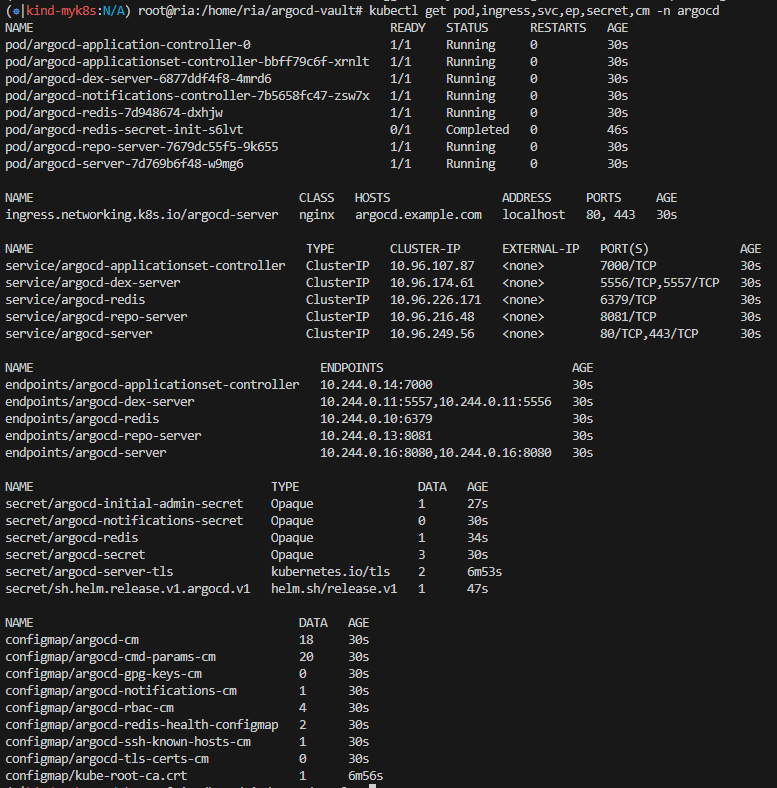
echo "127.0.0.1 argocd.example.com" | sudo tee -a /etc/hosts

kubectl -n argocd get secret argocd-initial-admin-secret -o jsonpath="{.data.password}" | base64 -d ;echo

argocd login argocd.example.com --insecure

argocd account update-password

admin/1234qwer
5-3. Vault 설치
helm repo add hashicorp https://helm.releases.hashicorp.com

helm repo update

helm search repo hashicorp/vault

vi vault-server-values.yaml
---
server:
  dev:
    enabled: true
    devRootToken: "root"
  logLevel: debug

injector:
  enabled: "false"


helm install vault hashicorp/vault -n vault --create-namespace --values vault-server-values.yaml
5-4. Vault CLI로 KV Secret 등록
root@ria:/home/ria/argocd-vault# kubectl exec -n vault vault-0 -it -- sh
/ $ vault secrets enable kv-v2
Success! Enabled the kv-v2 secrets engine at: kv-v2/
/ $ vault kv put kv-v2/demo user="ria" password="ria1031"
= Secret Path =
kv-v2/data/demo

======= Metadata =======
Key                Value
---                -----
created_time       2025-11-12T13:23:09.46253118Z
custom_metadata    <nil>
deletion_time      n/a
destroyed          false
version            1
/ $ vault policy write demo - <<EOF
> path "kv-v2/data/demo" {
>   capabilities = ["read"]
> }
> EOF
Success! Uploaded policy: demo
/ $
/ $ vault auth enable kubernetes
Success! Enabled kubernetes auth method at: kubernetes/
/ $
/ $ vault write auth/kubernetes/config \
>   token_reviewer_jwt="$(cat /var/run/secrets/kubernetes.io/serviceaccount/token)" \
>   kubernetes_host="https://$KUBERNETES_PORT_443_TCP_ADDR:443" \
>   kubernetes_ca_cert=@/var/run/secrets/kubernetes.io/serviceaccount/ca.crt
Success! Data written to: auth/kubernetes/config
/ $
/ $ vault write auth/kubernetes/role/argocd \
>   bound_service_account_names=argocd-repo-server \
>   bound_service_account_namespaces=argocd \
>   policies=demo \
>   ttl=48h \
>   audience=vault
Success! Data written to: auth/kubernetes/role/argocd
5-5. ArgoCD Vault Plugin 설치 및 설정
argocd-repo-server에 argocd-vault-plugin을 설치하고 vault 인증정보를 설정하면 ArgoCD에서 동기화할 때 vault 값을 kubernetes 설정 정보에 반영해서 적용합니다.
vi vault-plugin-secret.yaml

kind: Secret
apiVersion: v1
metadata:
  name: argocd-vault-plugin-credentials
  namespace: argocd
type: Opaque
stringData:
  AVP_AUTH_TYPE: "k8s"
  AVP_K8S_ROLE: "argocd"
  AVP_TYPE: "vault"
  VAULT_ADDR: "http://vault.vault:8200"

kubectl create -f vault-plugin-secret.yaml
argocd-repo-server를 패치하여 argocd-vault-plugin을 다운로드하고 사이드카를 정의하기 위한 initContainer 추가
kubectl edit deployment argocd-repo-server -n argocd -o yaml

# custom-tools volume 추가
volumes:
      - configMap:
          name: cmp-plugin
        name: cmp-plugin
      - emptyDir: {}
        name: custom-tools


# initContainer 추가
initContainers:
      - name: download-tools
        image: alpine/curl
        env:
          - name: AVP_VERSION
            value: 1.15.0
        command: [sh, -c]
        args:
          - >-
            curl -L https://github.com/argoproj-labs/argocd-vault-plugin/releases/download/v$(AVP_VERSION)/argocd-vault-plugin_$(AVP_VERSION)_linux_amd64 -o argocd-vault-plugin &&
            chmod +x argocd-vault-plugin &&
            mv argocd-vault-plugin /custom-tools/
        volumeMounts:
          - mountPath: /custom-tools
            name: custom-tools


# custom-tools mount 추가, env 추가
# AVP-Helm : argocd-vault-plugin with Helm
containers:
      - name: avp-helm
        command: [/var/run/argocd/argocd-cmp-server]
        image: quay.io/argoproj/argocd:v2.7.4
        securityContext:
          runAsNonRoot: true
          runAsUser: 999
        volumeMounts:
          - mountPath: /var/run/argocd
            name: var-files
          - mountPath: /home/argocd/cmp-server/plugins
            name: plugins
          - mountPath: /tmp
            name: tmp

          # Register plugins into sidecar
          - mountPath: /home/argocd/cmp-server/config/plugin.yaml
            subPath: avp-helm.yaml
            name: cmp-plugin

          # Important: Mount tools into $PATH
          - name: custom-tools
            subPath: argocd-vault-plugin
            mountPath: /usr/local/bin/argocd-vault-plugin
상태 확인
kubectl logs -f argocd-repo-server-5fb98c4c5f-k2b86 -n argocd repo-server
5-6. 샘플 애플리케이션 배포 (Secret 참조 포함)
argocd repo add https://github.com/ria-choi/argocd-vault-sample \
  --username ria-choi \
  --password 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

argocd repo list
TYPE  NAME  REPO                                             INSECURE  OCI    LFS    CREDS  STATUS      MESSAGE  PROJECT
git         https://github.com/ria-choi/argocd-vault-sample  false     false  false  false  Successful
cat application.yaml
apiVersion: argoproj.io/v1alpha1
kind: Application
metadata:
name: demo
namespace: argocd
spec:
destination:
namespace: argocd
server: https://kubernetes.default.svc
project: default
source:
path: infra/helm
repoURL: https://github.com/ria-choi/argocd-vault-sample
targetRevision: main
plugin:
env:
- name: HELM_ARGS
value: '-f override-values.yaml'
syncPolicy:
automated:
prune: true
selfHeal: true
kubectl apply -f application.yaml
kubectl get application -n argocd
NAMESPACE NAME SYNC STATUS HEALTH STATUS
argocd demo Unknown Healthy5-7. ArgoCD App Sync
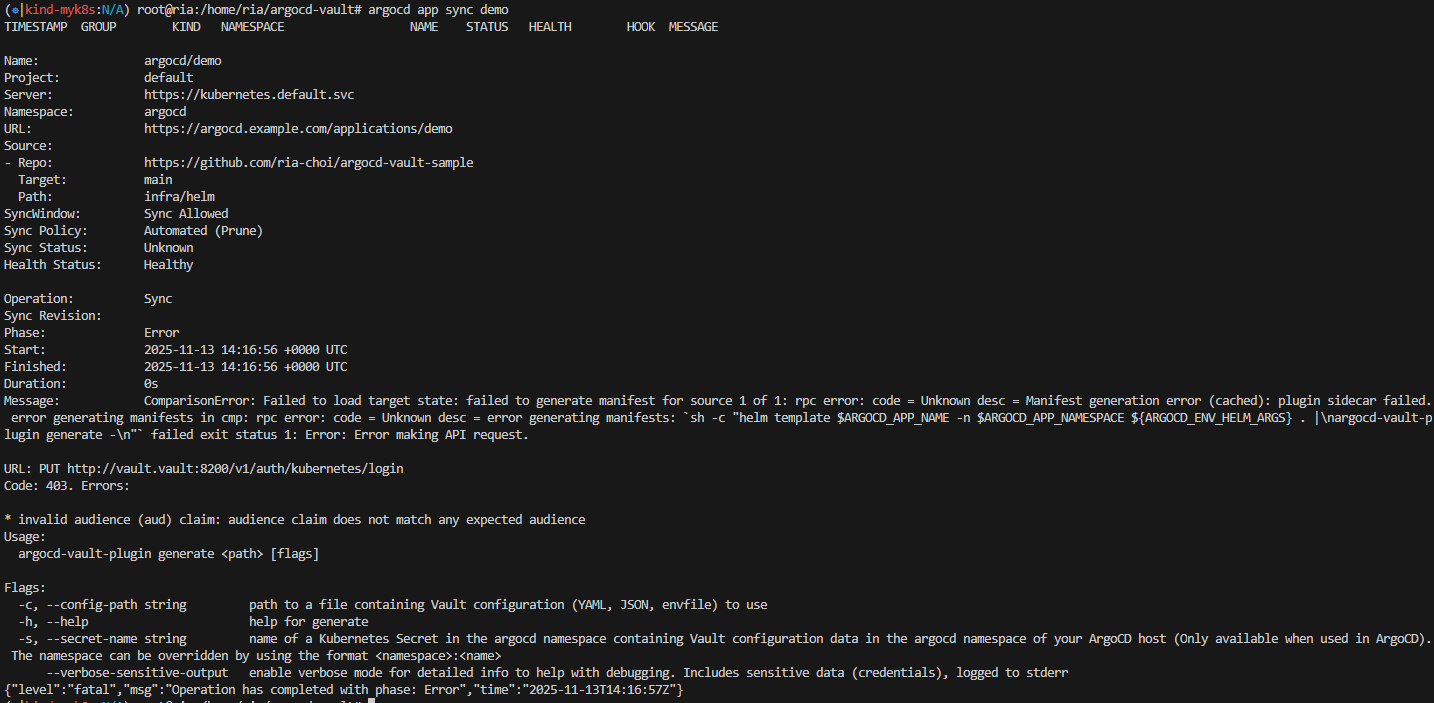
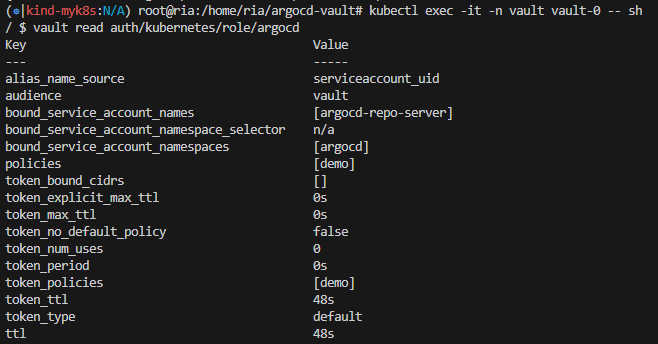
***에러 발생
(결국 해결 못함.. 버전업그레이드해서 다시 해보기)
Message:            ComparisonError: Failed to load target state: failed to generate manifest for source 1 of 1: rpc error: code = Unknown desc = Manifest generation error (cached): plugin sidecar failed. error generating manifests in cmp: rpc error: code = Unknown desc = error generating manifests: `sh -c "helm template $ARGOCD_APP_NAME -n $ARGOCD_APP_NAMESPACE ${ARGOCD_ENV_HELM_ARGS} . |\nargocd-vault-plugin generate -\n"` failed exit status 1: Error: Error making API request.

URL: PUT http://vault.vault:8200/v1/auth/kubernetes/login
Code: 403. Errors:

* invalid audience (aud) claim: audience claim does not match any expected audience
참고
ArgoCD Vault Plugin | docmoa
ArgoCD Vault Plugin
ArgoCD Vault Plugin 연동방안
docmoa.github.io
[GitOps]ArgoCD에 Vault 적용하기
ArgoCD로 kubernetes로 자동배포를 위해 git 저장소를 이용하는데 configmap, secret의 민감한 정보 관리를 위해 vault를 적용해서 GitOps를 구성한 경험을 정리한 글입니다.
velog.io
'CI&CD' 카테고리의 다른 글
| [Vault] Kubernetes 환경에서 Vault로 시크릿 관리 자동화하기 (Vault Agent + AppRole + Injection) (0) | 2025.11.29 |
|---|---|
| [CI/CD] OpenLDAP + KeyCloak + Argo CD + Jenkins 구축 과정 (1) | 2025.11.23 |
| [ArgoCD] HA 구성으로 안정적인 배포 자동화 구현 (0) | 2025.11.06 |
| [CI/CD] Tekton + ArgoCD로 만드는 CI/CD 파이프라인 (1) | 2025.11.01 |
| [Helm] ConfigMap 변경 감지 기반 자동 롤링 업데이트 구현 (0) | 2025.10.22 |


